 Credit: Lucas Gouveia / Android Police | klyaksun / Shutterstock
 By
Chethan Rao
Published 24 minutes ago
By
Chethan Rao
Published 24 minutes ago
Chethan is a reporter at Android Police, focusing on the weekend news coverage for the site. He has covered tech for over a decade with multiple publications, including the likes of Times Internet, Guiding Tech, and Android Headlines, to name a few. Chethan's love for Android dates back to the days of the Samsung/Google Nexus S, with his first Android phone being the HTC Desire HD back in 2010. Away from work, he's on the lookout for live cricket streams or NBA highlights. He also enjoys the occasional hour or two of console/mobile gaming whenever time permits.
Sign in to your Android Police account Summary Generate a summary of this story follow Follow followed Followed Like Like Thread Log in Here is a fact-based summary of the story contents: Try something different: Show me the facts Explain it like I’m 5 Give me a lighthearted recapGoogle has gone to great lengths to integrate Gemini into every Workspace product, including Drive. As part of this push, Google introduced "nudges" at the top of the Drive home page and individual folders back in March. These nudges offered one-click access to key Gemini actions, such as the ability to summarize entire folders or files.
 Related
Google Drive now lets you chat with your images
Related
Google Drive now lets you chat with your images
Goodbye, text-only analysis
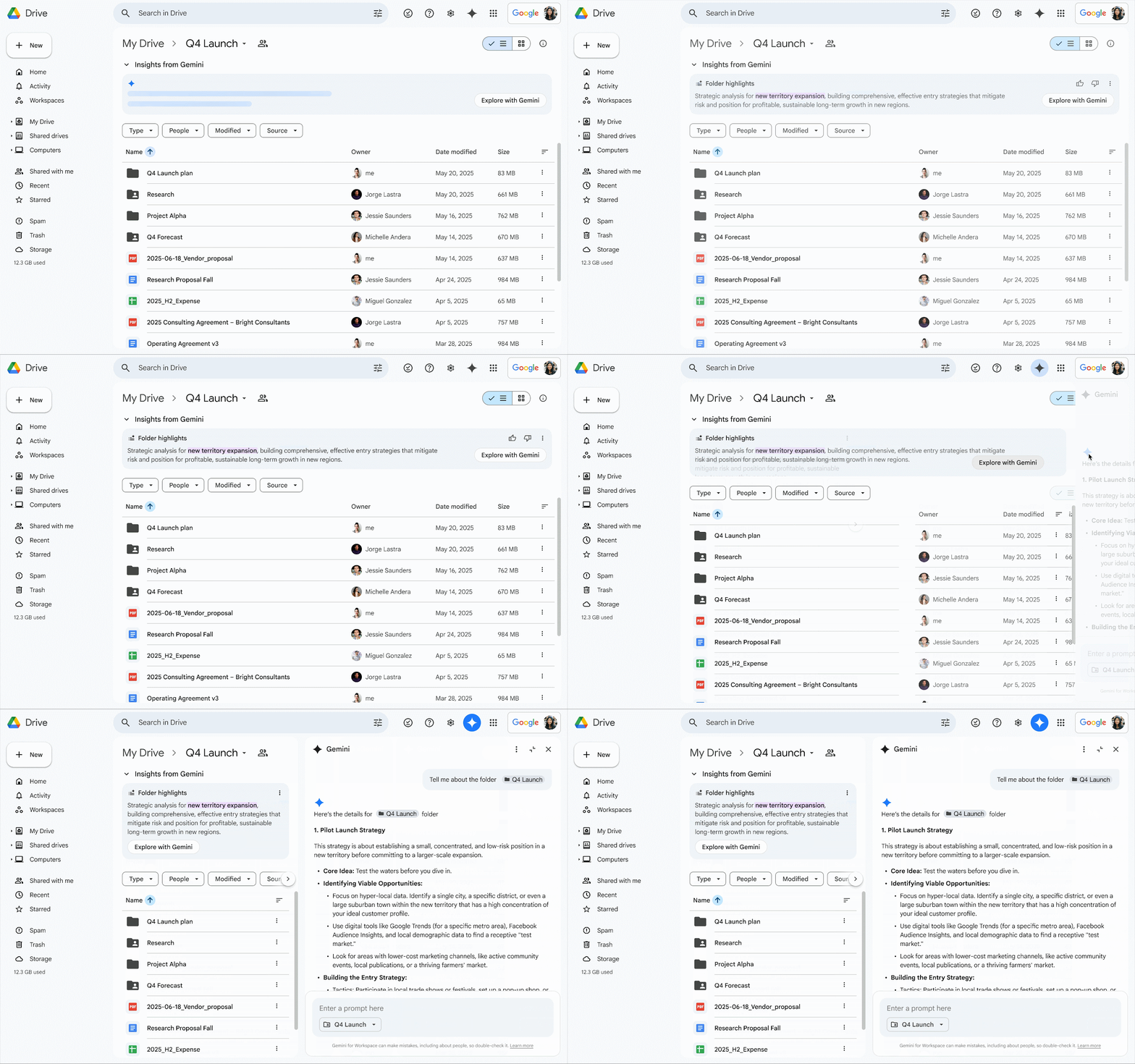
Posts By Karandeep Singh Oberoi Aug 26, 2025Now, Google is announcing an "evolution" of these AI nudges in the form of "insights." Instead of the horizontally placed chips at the top, users will now see "Insights from Gemini," offering a summary of all the files in the folder. Google says this will make it easier to quickly gauge what's in the folder without having to dive into each file.
For more info on the folder's contents, users can tap the "Explore with Gemini" chip within the insights panel at the top. This opens the Gemini side panel with a "full summary" of the folder. As you would expect, the side panel also lets you ask follow-up questions about the contents.
A logical evolution of nudges
 Credit: Google
This new insights section effectively replaces the existing "Ask Gemini" panel, which includes the soon-to-be-replaced nudges. In Google's own words, the updated panel replaces "simple suggestions" with "proactive, intelligent summaries." The insights panel also comes with thumbs-up and thumbs-down icons to rate the quality of the summary.
Google says the feature will be enabled by default, but users can collapse the panel if they don't want insights generated each time a folder is opened. If you find these insights to be too intrusive, you can hide them entirely by disabling smart features in Drive from the privacy settings page. However, this may come at the expense of losing out on some of the other Gemini-related features.
 Related
NotebookLM just made working with Google Drive a lot easier
Related
NotebookLM just made working with Google Drive a lot easier
Search smarter, not harder
Posts By Rahul Naskar Oct 8, 2025This updated insights panel is only available in English right now and will roll out over the next few weeks to the Google One AI Premium and Google AI Pro for Education tiers, as well as Workspace Business Standard/Plus, and Enterprise Standard/Plus customers.
The introduction of the Insights with Gemini panel follows the launch of "Catch me up" in June. This feature provides an overview of file edits in Docs since your last visit, as well as details on comments across Docs, Sheets, and Slides files.
-
 Applications
We want to hear from you! Share your opinions in the thread below and remember to keep it respectful.
Be the first to post Images Attachment(s) Please respect our community guidelines. No links, inappropriate language, or spam.Your comment has not been saved
Send confirmation emailThis thread is open for discussion.
Be the first to post your thoughts.
- Terms
- Privacy
- Feedback
 19 hours ago
Google TV's 'best of 2025' is here to fill up your watchlist
 1 day ago
Your Android phone's document scanner is gearing up for a visual overhaul
 51 minutes ago
An absurd US price will ruin the Galaxy Z TriFold, and Apple showed us why
 1 day ago
5 everyday tasks that got simpler now that my ID lives in Samsung Wallet
Trending Now Android gets an abundance of updates and a new schedule for them
 You can no longer Call Home on the Google Home app
 The simple fix that brought my Spotify DJ back to life